

Table of Contents
Introduction: Why Computer Viruses Still Matter in 2026
The term computer virus may sound outdated in an era dominated by ransomware, spyware, and large-scale cyberattacks. However, computer viruses remain a foundational concept in cybersecurity, helping explain how malicious software infects systems, spreads between files, and enables larger attacks.
Even in 2026, many modern cyber incidents begin with virus-like infection techniques, especially through email attachments, cracked software, and document macros. Understanding what a computer virus is—and how it works—remains essential for individuals, students, and organizations.
What Is Computer Virus?
A computer virus is a type of malicious software designed to:
- Attach itself to a legitimate file or program
- Activate when the host file is executed
- Replicate by infecting other files or system components
Unlike some other malware types, a computer virus cannot operate independently. It relies on a host program and typically requires user interaction, such as opening a file or running an infected application.
This host-dependent nature is the defining characteristic of a computer virus.
How a Computer Virus Works (Lifecycle Explained)
Most computer viruses follow a predictable lifecycle:
1. Dormant Phase
The virus is present but inactive inside a file or program.
2. Propagation Phase
When the host file runs, the virus copies itself into other executable files or memory locations.
3. Trigger Phase
The virus activates based on a specific condition (date, number of executions, or system event).
4. Execution Phase
The virus carries out its payload, which may include:
- Corrupting or deleting files
- Slowing system performance
- Creating backdoors
- Disabling security tools
This lifecycle explains why viruses can remain undetected for long periods.
Types of Computer Viruses (Modern Classification)
Rather than outdated textbook lists, modern classification focuses on behavior and impact:
| Virus Type | Core Behavior | Typical Impact |
| File Infector Virus | Attaches to executable files | Spreads via shared software |
| Macro Virus | Uses document scripts | Common in email attachments |
| Polymorphic Virus | Changes its own code | Evades detection |
| Resident Virus | Loads into system memory | Persists after file closure |
| Boot Sector Virus | Infects startup records | Can prevent system boot |
| Overwrite Virus | Destroys file content | Permanent data loss |
Modern viruses often act as delivery mechanisms for other malware rather than operating alone.
Computer Virus vs Other Malware (Clear Comparison)
Many online articles confuse viruses with malware in general. Here is a precise comparison:
| Malware Type | Needs Host File | Self-Spreading | Primary Purpose |
| Virus | Yes | Limited | Infection & persistence |
| Worm | No | Yes | Rapid network spread |
| Trojan | No | No | Unauthorized access |
| Ransomware | No | Sometimes | Financial extortion |
All viruses are malware, but not all malware are viruses.
What Cybersecurity Specialists Say About Computer Viruses
Cybersecurity analysts, malware researchers, and incident response specialists consistently observe that traditional computer viruses are now most commonly used as initial infection vectors.
Expert consensus highlights:
- Viruses are frequently embedded in:
- Cracked or pirated software
- Email attachments
- Macro-enabled documents
- Specialists report that viruses often act as a first-stage loader for:
- Ransomware
- Spyware
- Credential stealers
- Incident response teams note that early virus infections are often ignored because symptoms appear minor at first
This expert insight explains why viruses remain relevant despite the rise of newer threats.
Real-World Examples of Computer Viruses
- ILOVEYOU Virus – Spread through email attachments disguised as love letters, causing global damage.
- Melissa Virus – Used Microsoft Word macros to propagate through email contacts.
- Virut Virus – Infected executable files and turned systems into botnet nodes.
These examples demonstrate how human behavior plays a key role in virus success.
Case Study: ILOVEYOU Virus (Human Behavior Exploited)
What happened:
Users received an email attachment labeled as a love message. Opening the file activated the virus.
Impact:
- Tens of millions of computers infected
- Massive business disruption
- Billions in estimated damages
Key insight:
Even simple viruses can cause global damage when curiosity and trust are exploited.
Real Cost of Computer Virus Infections (Prices as Impact)
Instead of antivirus pricing, understanding the economic impact of viruses is far more useful.
Estimated Cost Impact of Virus Infections
| Cost Category | Estimated Range (USD) |
| Individual data recovery | $100 – $1,500 |
| Small business downtime | $10,000 – $50,000 |
| Mid-size business incident | $150,000 – $2.6M |
| Compliance & regulatory fines | $50,000+ |
| Productivity loss | 2–15 business days |
Studies show that indirect costs, such as downtime and lost trust, often exceed technical repair costs.
Geographical Distribution of Computer Virus Activity
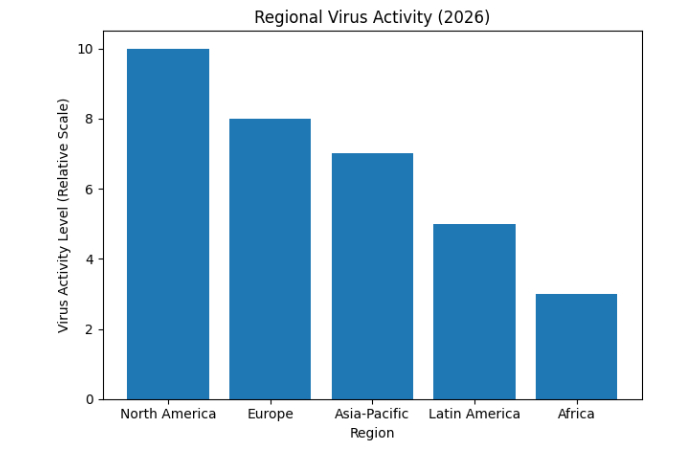
Virus activity varies significantly across regions due to operating system usage, patch adoption, and software practices.
Virus & Malware Activity by Region
| Region | Activity Level |
| North America | Very High |
| Europe | High |
| Asia-Pacific | Rapidly Increasing |
| Latin America | Moderate |
| Africa | Emerging |
Regional Virus Activity (2026)
What Users Commonly Report After Virus Infections (Aggregated Reviews)
Rather than product reviews, aggregated user experiences reveal common patterns.
Common User-Reported Symptoms
| Symptom | Frequency |
| System slowdown | Very High |
| Unexpected pop-ups | High |
| Browser redirects | High |
| Missing or corrupted files | Moderate |
| Unauthorized logins | Moderate |
| Disabled antivirus | Low but severe |
Performance slowdown is the most frequently ignored early warning sign.
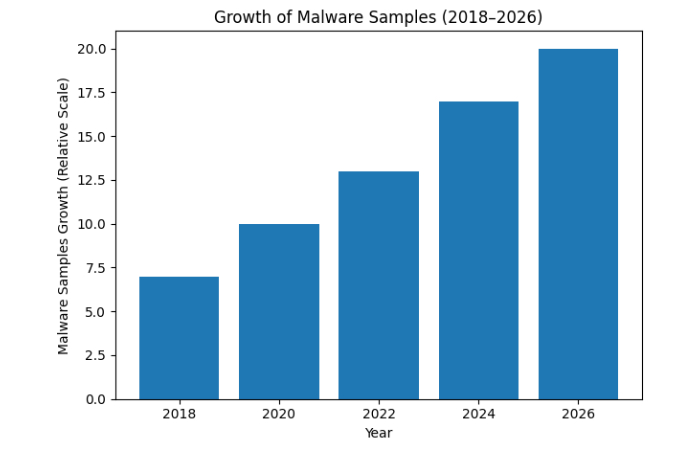
Malware & Virus Statistics (2026 Snapshot)
| Metric | Observation |
| New malware samples daily | 500,000+ |
| Known malware variants | 1+ billion |
| Malware targeting Windows | ~80% |
| Incidents involving data theft | ~40% |
| Average business impact | $2M+ |
While not all malware is a virus, virus-based infection methods remain a common entry point.
Growth of Malware Samples

Why Traditional Viruses Are Less Visible Today
Classic viruses are less common because:
- Modern operating systems restrict file execution
- Antivirus detection is more advanced
- Attackers prefer faster monetization methods
However, viruses still exist inside installers, scripts, and documents, often initiating larger attacks.
Evidence-Based Prevention Strategies
Research consistently shows effective protection includes:
- Regular OS and software updates
- Reputable antivirus with behavioral detection
- Disabling macros by default
- Avoiding pirated or unknown software
- Maintaining offline backups
No single tool prevents viruses—layered security does.
Conclusion: Understanding Computer Viruses in 2026
A computer virus is not an outdated threat—it is a core cybersecurity concept that explains how malicious software infects and spreads. While modern attacks have evolved, virus-based techniques remain a key entry point for cybercrime.
By understanding computer viruses, users and organizations can:
- Recognize early warning signs
- Reduce infection risks
- Better defend against modern malware threats
In cybersecurity, understanding the basics still delivers the strongest defense.
Also Read: Alkem Marketplace 2026: Features, ROI And Digital Ordering